- {{section.name}} x{{section.count}}

How to create a virtual 3D tour: step-by-step guide
Create a 360° virtual tour online in three steps: upload panoramas, add them to a tour, link scenes with hotspots, publish and embed. Free plan included.
Learn moreTags

x2 Cafe Project
x2 Sony A6500

x2 Ricoh theta
The Ricoh Theta S opens up a new world of 360-degree images and videos with a single touch of a button.
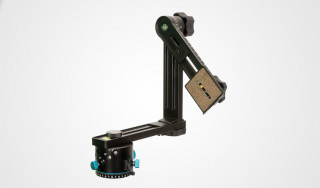
x2 Nodal Ninja 4
Nodal Ninja NN4 Tripod Head with RD16 II Rotator for Panoramas featuring For Spherical @ HDR Panoramas, Supports Up to 100mm Lenses 62mm Diameter/Nadir Footprint.
x2 night city
x2 The Worker and Kolkhoz Woman Monument
Worker and Kolkhoz Woman is a sculpture of two figures with a sickle and a hammer raised over their heads. It is 24.5 meters (78 feet) high, made from stainless steel by Vera Mukhina for the 1937 World's Fair in Paris, and subsequently moved to...
x2 Falcon Hill
x2 the stones
Showing 2,971-3,000 of 6,038 items.