09/29 2026
What is a 360-degree panorama? Spherical panoramas explained
A 360° (spherical) panorama covers the full 360 x 180 degree view. How it is shot, stitched and stored, equirectangular vs cubic projection, and its uses.
Spherical panorama The best

19K 6
A 360-degree panorama, also called a spherical panorama, 3D panorama or photo sphere, is a panoramic photograph that covers the entire view around the camera: 360 degrees horizontally and 180 degrees vertically, from the floor to the sky. Unlike a normal wide panorama it is not meant to be printed. It is viewed in a player that places you inside a sphere and lets you look in any direction, which is why it feels as if you were standing on the spot. Spherical panoramas are the building blocks of every virtual tour.
How a spherical panorama works
The panorama is stored as a flat image and the player wraps it around the inside of a sphere. Three things define it:
- Field of view: the full 360 x 180 degrees. Anything less (for example a 360 x 120 "cylindrical" panorama) leaves black holes at the zenith and nadir.
- Projection: the way the sphere is unwrapped onto the flat file. Almost all cameras and software use the equirectangular projection; players may convert it to a cubic projection internally.
- Resolution: the width of the equirectangular image in pixels. Consumer 360° cameras produce 6,000 to 11,000 pixels; DSLR stitches and renders reach 20,000 to 65,000 pixels and more (gigapixel panoramas).
Equirectangular projection
An equirectangular (also "equidistant" or "spherical") panorama is an image with a 2:1 aspect ratio, for example 8,000 x 4,000 pixels. Longitude runs along the width, latitude along the height. The centre row is undistorted, while the top and bottom rows are stretched: a single point at the zenith becomes the whole top edge. This is why an equirectangular file looks strange as a plain picture but is perfect for a viewer.
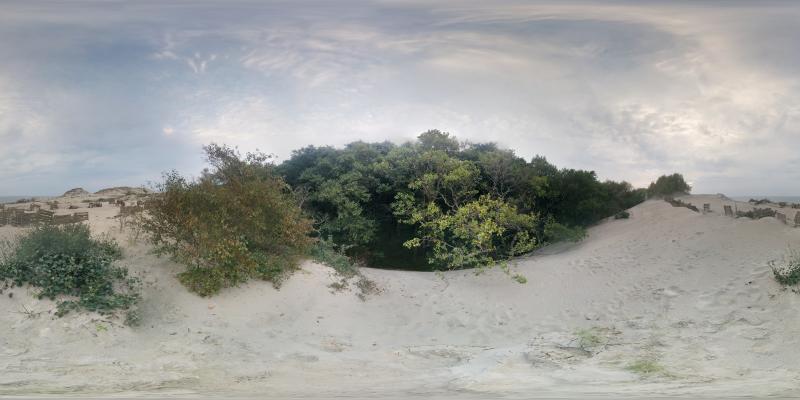
An example of a spherical panorama file in the equirectangular projection, aspect ratio 2:1. This is the format TrueVirtualTours accepts for upload: JPEG, from 2,000 x 1,000 up to 65,500 x 32,750 pixels, up to 500 MB per file.
Cubic projection
After stitching, a panorama is normally equirectangular. To display it, the player can also convert it into six square faces of a cube (front, back, left, right, up, down). Cubic faces have no stretching and were the classic format for Flash and early VR players; modern players such as krpano work with either and additionally cut the image into multi-resolution tiles, so the viewer only downloads the part of the sphere that is on screen at the current zoom.
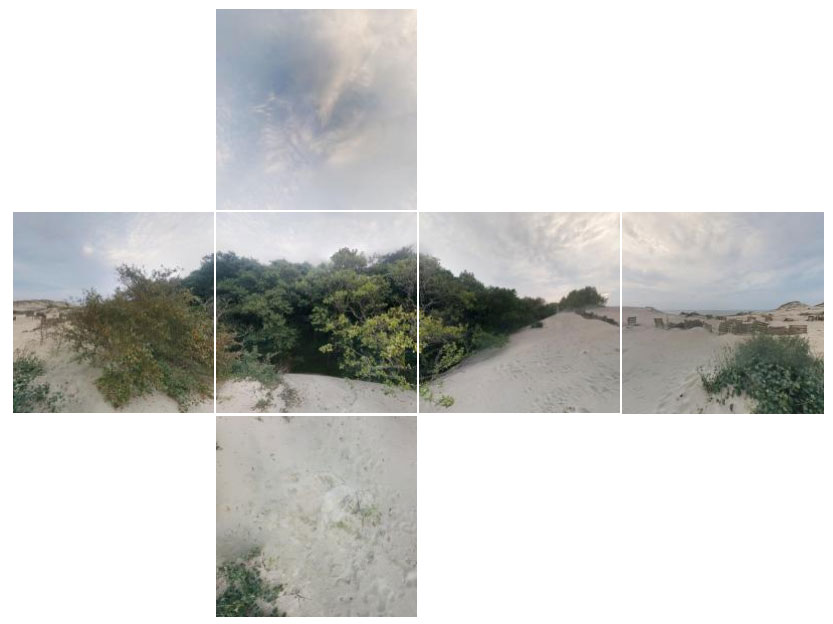
On TrueVirtualTours the conversion is automatic: you upload the equirectangular JPEG and the site produces the tiles, the preview and the cube faces used by the viewer.
How spherical panoramas are made
360° cameras
Cameras such as Insta360, Ricoh Theta, GoPro Max or Kandao use two or more fisheye lenses and stitch the panorama automatically in the camera or the phone app. One shot, no tripod required, resolution from 5.7K to 11K. This is the fastest way and is enough for real estate, hotels and travel. See the current models in our 360 camera guide.
DSLR or mirrorless camera with a panoramic head
A camera on a panoramic head shoots a series of overlapping frames around the no-parallax point (for example 6 to 8 frames with a fisheye lens, or 30 and more with a normal lens). The frames are stitched in software. The result is far sharper than a 360° camera and can reach gigapixel size. Stitching software includes PTGui, Hugin, Panorama Tools and PTAssembler; Kolor Autopano was discontinued but is still in use.
Rendered panoramas
3D software (3ds Max with Corona or V-Ray, Blender, Unreal, Twinmotion) can render the scene directly as an equirectangular image. This is how architects present buildings that do not exist yet. Read how it is done in 3ds Max: rendering a panorama in 3ds Max and Corona.
Smartphones
Phone apps can sweep a panorama, but the stitching seams and the missing nadir usually make them unsuitable for commercial use.
Where 360° panoramas are used
- Virtual tours of flats, houses and offices for real-estate listings.
- Hotels, restaurants and venues, shown from inside before the booking.
- Museums, galleries and landmarks, including places that are closed to visitors.
- Architecture and development: rendered panoramas of future interiors.
- Cars, yachts and showrooms, where a normal photo cannot show the interior.
- Tourism and cities: panoramas placed on a map.
- Street View-style mapping and industrial documentation.
Viewing and sharing a spherical panorama
Because of the distortion in the flat file, a spherical panorama is never shown as an ordinary image. It needs a player. On TrueVirtualTours the player runs in the browser on any device: drag to look around, scroll to zoom, gyroscope control on phones, a VR button for headsets, and fullscreen. Once uploaded, every panorama gets:
- a page with a link, a title, a description, tags and a location on the map;
- an iframe code to embed it on your website;
- a views counter and statistics;
- the option to link it with other panoramas into a virtual tour.
Hosting is free for up to 15 panoramas per 30 days; the plans are described at 360° panorama hosting. If you are a client rather than a photographer, the partners page lists photographers who shoot panoramas and tours to order.
Frequently asked questions
What is the difference between a 360° panorama and a 360° photo?
None in practice. "360 photo", "photo sphere", "spherical panorama" and "VR panorama" all describe the same 360 x 180 image. A "360° video" is the same projection applied to video frames.
What resolution should a panorama have?
For a phone screen 6,000 pixels wide is enough; for a desktop in fullscreen 10,000 to 16,000 looks sharp; for zooming into detail (museums, industrial sites) 30,000 and more. TrueVirtualTours accepts up to 65,500 pixels and streams tiles, so the large size costs the viewer nothing.
Can I convert a panorama between projections?
Yes. Upload an equirectangular panorama and the site generates the cubic faces and tiles for the viewer automatically. The other direction (cube faces to equirectangular) is done in PTGui, Hugin or krpano tools before upload.
Do I need special software to view one?
No. A browser is enough on any device. VR mode works with a headset or by holding a phone in split-screen mode.
Watch the short video on how to place an interactive spherical panorama on your website, or upload your first panorama now.
Related articles
Best 360 cameras for virtual tours in 2026
-
 today
todayJohn Smith
-
 03/30 2023
Gizatovna.n.04
let me upload the panorama!!!!!1
Translated from Russian -
 02/11 2019
Rusin.52
Tell me how to delete your panorama in the sphere of the Russian Federation?
Translated from Russian -
 02/11 2019
Erm9
Interesting.
Translated from Russian -
 02/11 2019
Vadim_pv
why chopped file size 10 megs? no normal panorama will fit
Translated from Russian -
 02/11 2019
Lofg122
Why don't new loaded panoramas appear?
Translated from Russian -
 02/11 2019
Dimaxxx
Why don't long photos appear in panoramas? https://sferika.ru/tour/2281/7227
Translated from Russian